
How to Set Up a Chore Chart for Kids That Lasts Past Week Two
Last updated
Set up a chore chart for kids by starting small — one or two daily chores and one weekly chore per child — matched to their age, written so they know exactly what done looks like, and tied to a fixed time of day. Let children tick chores off themselves and review the chart once a week. In FamHive you assign a chore with a deadline, your child marks it done from their own view, and you are notified when it is completed.
A chore chart is one of the most-started and least-finished projects in family life. The chart goes up with enthusiasm, the stickers run out in week two, and by week three a parent is doing the chores again because asking takes longer.
The charts that last have less to do with design than with a few decisions made at the start. Here they are.
Start with fewer chores than you think
The most common reason a chore chart fails is that it begins with too many chores. A list of eight tasks for a seven-year-old is a list of eight things to argue about.
Start with one or two daily chores and one weekly chore per child. A short list done every day builds the habit. You can add more once the first ones happen without reminders — usually after three or four weeks.
Match chores to age
Chores that are too hard produce failure; chores that are too easy feel like a babyish game. These ranges are a starting point, not a rule — children vary a lot.
| Age | Chores that usually work |
|---|---|
| 2–3 | Put toys in a box, clothes in the hamper, help wipe a spill |
| 4–5 | Set the table, feed a pet, make the bed roughly, match socks |
| 6–9 | Empty the dishwasher, sort laundry, tidy their room, pack their school bag |
| 10–12 | Vacuum a room, take bins out, make a simple lunch, water plants |
| 13+ | Do their own laundry, cook a family meal, help with the weekly shop |
For children under six, see our guide to using a family organizer app with young kids.
Define what “done” looks like
“Tidy your room” means one thing to a parent and something else to a nine-year-old. Every chore on the chart should describe the finished state:
- Not “tidy your room” but “clothes in the drawer or hamper, floor clear, bed made”.
- Not “help with dinner” but “set four places: plate, fork, knife, glass”.
- Not “feed the dog” but “one scoop in the bowl, fresh water, before school”.
It feels pedantic. It removes most of the “but I did it” arguments before they start.
Tie each chore to a time, not a mood
A chore that can happen “sometime today” happens at bedtime, in tears. A chore attached to an existing moment — after breakfast, straight after school, before screen time — becomes routine.
Write the time on the chart next to the chore, and the days it repeats. When everyone can see who is up and by when, the question “whose turn is it?” answers itself.
Let children tick chores off themselves
This is the step that ends the nagging. If the only person who can mark a chore complete is the parent, the chart is a parent’s to-do list, and the parent is still the one chasing.
Let the child see their own chores and mark them done. Then make sure you find out without asking, whether that is a glance at the fridge on the way past or a notification on your phone.
Rotate the unpopular jobs
Siblings keep a very precise record of who took the bins out last. Rotation removes the argument: the unpopular chores move between children on a fixed schedule that everyone can see, written down rather than remembered.
A worked example: one week for a 6- and a 10-year-old
Here is what the advice above looks like on a real chart, for Leo (6) and Maya (10). Every chore has a time, a description of done, and a star value.
| Chore | Who | When | Done means | Stars |
|---|---|---|---|---|
| Make the bed | Leo | Daily, before breakfast | Duvet pulled up, pillow at the top | 1 |
| Set the table | Leo | Daily, 6:00 pm | Four places: plate, fork, glass | 2 |
| Tidy bedroom | Leo | Saturday, 10:00 am | Floor clear, toys in their boxes | 5 |
| Empty the dishwasher | Maya | Daily, after school | Everything put away, door shut | 3 |
| Pack the school bag | Maya | School nights, 8:00 pm | Homework, water bottle, PE kit on Tuesdays | 1 |
| Take the bins out | Maya | Thursday, 7:00 pm | Bins at the kerb, lids shut | 3 |
| Feed the cat | Alternate weeks | Daily, before school | One scoop, fresh water | 1 |
Add it up before the first week, not after the first argument. Leo’s chores come to 26 stars a week and Maya’s to 29; the cat adds 7 to whoever has it that week. Close enough that neither child can call it unfair, and the older child earns slightly more for slightly harder work.
Decide on rewards before you start
There are three common approaches, and each works if it is agreed upfront:
- No rewards. Chores are part of being in the family. Simple, and it works best when started young.
- Points or stars towards rewards. Completed chores earn stars that are traded for things the family agrees on — a later bedtime, choosing dinner, an outing.
- Money. Chores earn pocket money. This teaches a lot about earning, and needs a clear rule about which chores are paid. Our allowance for chores guide covers this properly.
Whatever you choose, keep the rule the same for at least a month. Changing the reward system every week teaches children to wait for the next one.
Pricing stars so the system stays fair
If you use stars, price both sides before you start. A simple rule: one star for roughly five minutes of effort, plus one for a chore nobody wants. Then price rewards against what a child earns in a week. In the example above that is about 30 stars.
| Reward | Stars | How often a child can afford it |
|---|---|---|
| Choose what’s for dinner | 10 | Most weeks |
| 30 minutes of extra screen time | 15 | Every week or two |
| Later bedtime on Saturday | 20 | About twice a month |
| A day out they choose | 60 | Every couple of months |
A menu with one cheap reward and one that takes saving up keeps both the child who wants something now and the child who likes a goal interested.
Review the chart once a week
A short weekly review keeps the chart honest:
- Which chores happened without reminders? Those are ready for a harder version.
- Which were missed every day? The chore may be too hard, badly timed or badly described.
- Is the rotation fair? Children will tell you.
Five minutes, ideally at the same time as looking at the family calendar for the week ahead.
What this looks like in FamHive
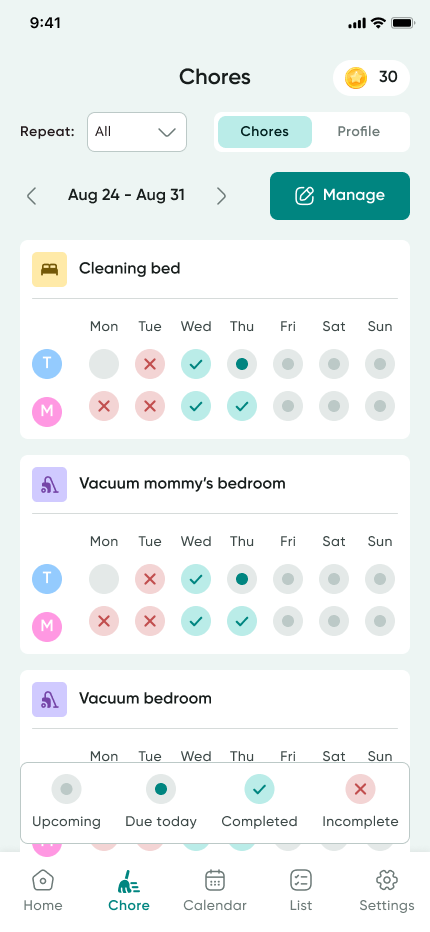
FamHive is the family organizer we make, and its chore chart is built around the steps above. A parent adds a chore under Manage, assigns it to one or more children, sets the days it repeats and a deadline, and gives it a star value. If you are not sure where to start, FamHive can suggest chores based on your household routine.
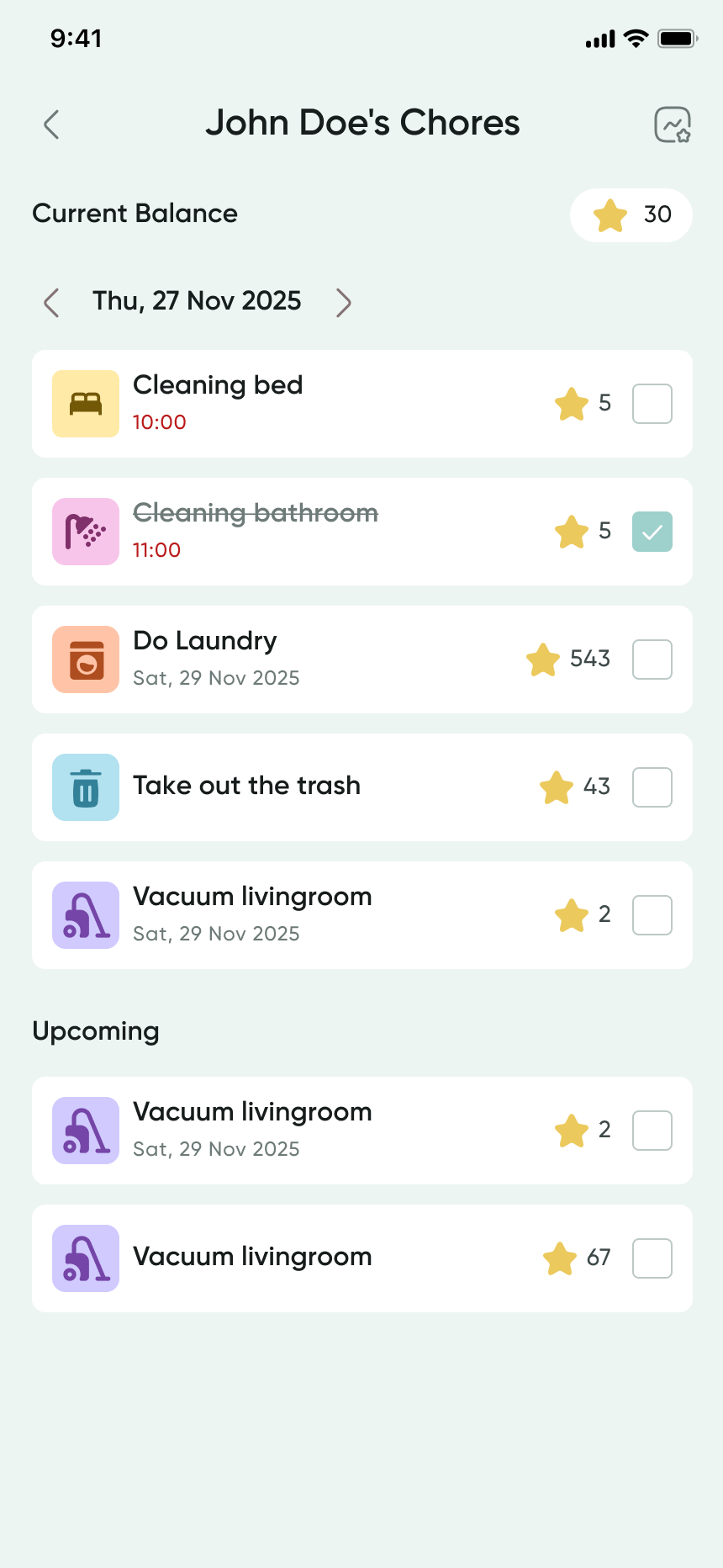
Each child sees only their own list: today’s chores with their deadlines and star values, and their balance at the top. They tick a chore off themselves, and the parent gets a notification when it is done. For younger children, Kid Mode shows a simplified view.
Completed chores build up each child’s balance, and parents set the rewards it can be spent on. Reward history is kept, so nobody has to remember who already cashed in their stars this month.
What an app will not do for you
An app moves the chart onto a screen. It does not change the parts that make a chart work, and it adds a few problems of its own:
- It cannot check the work. A ticked box means the child says it is done. Look at the first few attempts at every new chore, until done means the same thing to both of you.
- The child needs a screen. Under about five, a paper chart they can touch works better. A shared family tablet in Kid Mode works for school-age children without a phone of their own.
- A notification is not praise. When the “chore completed” alert arrives, say something to the child. The alert tells you; it does not tell them.
Paper chart or app?
A paper chart on the fridge works well for young children, who like the physical act of ticking a box, and for families where everyone is in the kitchen at the same time every morning.
An app earns its place once schedules spread out: children at different schools, parents working different hours, chores that happen when the parent is not home. It also keeps the history, which matters once chores are tied to allowance.
Some families do both — a paper chart for the youngest, the app for everyone else. There is no wrong answer, as long as there is one chart everyone treats as the real one.